Projects — Released
VoodooScribe
 Released
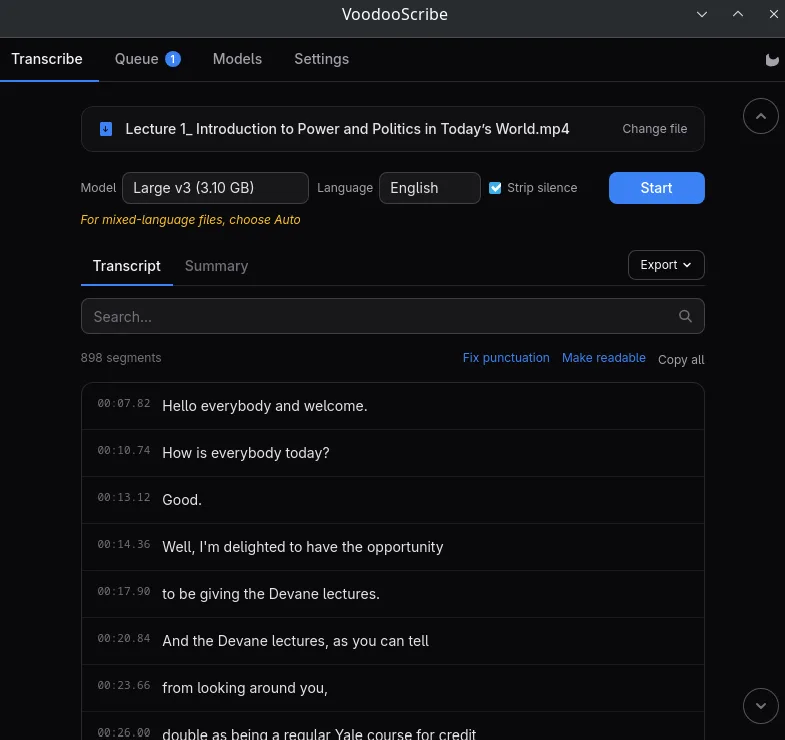
Transcription of the selected file displayed.
VoodooScribe: offline transcription software for Windows, macOS and Linux
Turn interviews, lectures, meetings and voice notes into timecoded, searchable text, entirely on your own computer. No cloud, no account, no subscription, no per-minute billing.
Transcription that never leaves your machine
Most transcription tools upload your recording to somebody else’s server. VoodooScribe has no server. It runs OpenAI’s Whisper model locally, on your own graphics card, and the file never moves off your disk.
That matters if you handle recordings you cannot legally or comfortably send to a third party: patient consultations, client calls, HR interviews, research material under an ethics agreement, anything under NDA. Once the models are downloaded, the application works with the network cable unplugged.
What you get from a recording
Every line comes with its own timestamp, so you can search the transcript, jump to a moment and copy a single line. Drop in a two-hour lecture and you get a navigable document, not a wall of text.
Beyond the raw transcript, a language model running on the same machine can:
- Summarize the recording in plain language, briefly or as a structured report with sections and key points;
- Fix punctuation in raw speech, adding capitals and sentence boundaries and dropping filler words, without changing a single word that was said;
- Make it readable, additionally correcting grammar, which matters in languages where speech and written text differ more than in English.
Both run locally, like the transcription itself.
Built for real recordings
Mixed languages in one file. A meeting that switches between languages mid-sentence is detected per phrase rather than once for the whole file, so the second language is not transcribed as gibberish.
No invented text over silence. Whisper is known for filling pauses with “Thanks for watching!” and similar subtitle boilerplate. VoodooScribe detects speech before transcribing and filters what still slips through, in every language it supports.
31 audio and video formats. MP3, MP4, WAV, M4A, MKV, WebM, Opus, FLAC and the rest. If you can play it, you can transcribe it.
Batch processing. Select as many recordings as you like, then start the run in one click.
Export. Transcripts save as TXT, SRT, VTT, Markdown, JSON or Word: subtitles for video, documents for everything else. Summaries save as Markdown, TXT or Word.
Free, open source, yours
VoodooScribe is free software under the GPL-3.0 license. There is no trial, no watermark, no feature locked behind a paid tier, and no telemetry. The source code is public and the application can be audited or built by anyone.