Projects — Released
NahNotToday Privacy & Security
 Released
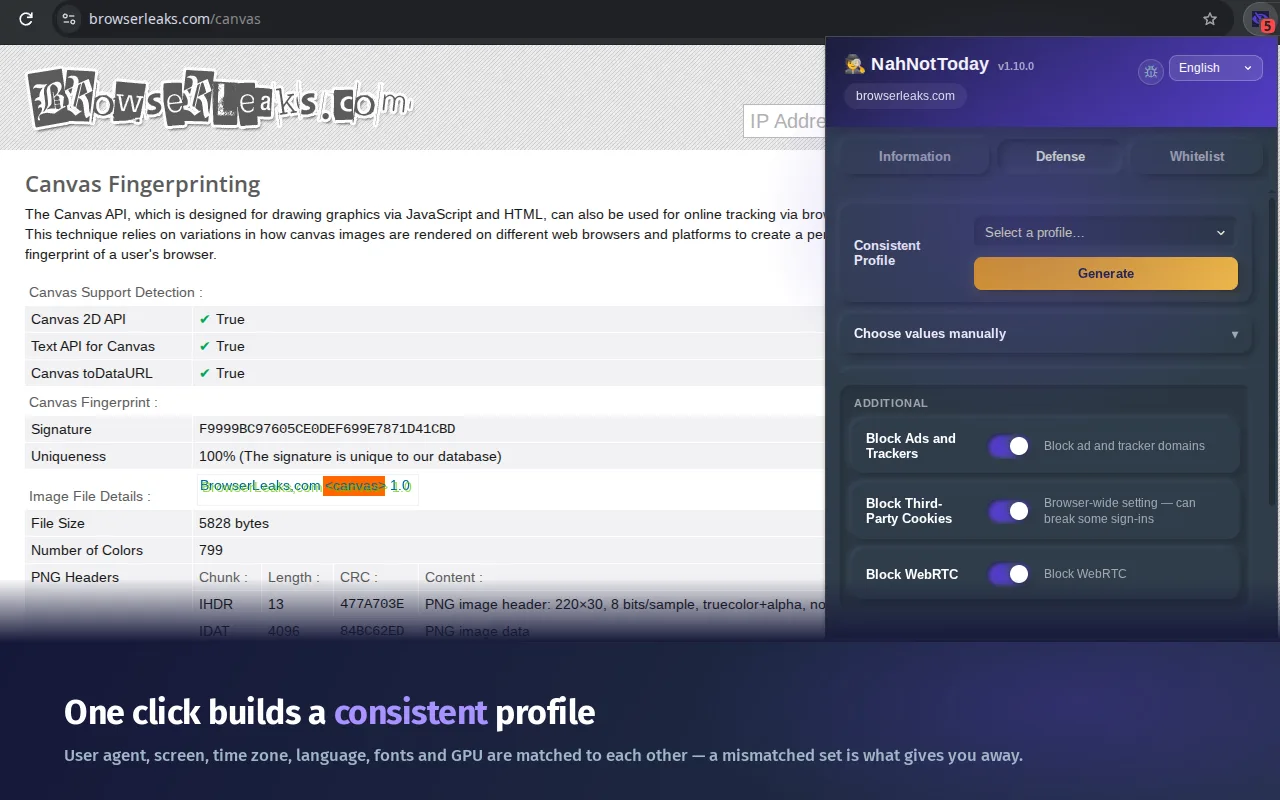
The "Defense" tab where you can generate a consistent profile.
Stop Browser Fingerprinting. Nah Not Today.
Free anti-fingerprinting extension for Chrome and Firefox.
You cleared your cookies. You opened a private window. You turned on a VPN. And the ads still followed you around.
That’s browser fingerprinting. Websites don’t need cookies to recognize you any more. They measure your browser instead. Your screen size. Your fonts. Your graphics card. The tiny quirks in how your computer draws a picture. Put together, those details add up to an ID as unique as a real fingerprint, and clearing your history doesn’t touch it.
NahNotToday changes those details instead of hiding them, so the ID they add up to isn’t yours any more.
What is browser fingerprinting?
Every browser quietly answers dozens of technical questions when a page asks. On their own the answers are boring. Together they’re a name tag.
A tracking company doesn’t need to store anything on your computer to use it. It just measures you again on the next site and matches the numbers. That’s why it survives everything people normally do for privacy: the fingerprint isn’t stored on your machine, it is your machine.
Why a VPN and incognito mode don’t stop it
A VPN changes your IP address. Incognito mode forgets your history. Neither one changes a single thing a fingerprint is made of.
Open a private window with a VPN on and your fonts, screen, graphics card and audio stack are all exactly what they were a minute ago. The tracker recognizes you immediately. Ad blockers can’t help either, because there’s no cookie to block.
Fingerprinting needs a different answer, and that’s the one this extension gives.
How NahNotToday protects you
It doesn’t switch the signals off. A browser that answers nothing is the most suspicious browser on the internet. It gives believable answers instead, and keeps giving the same ones all session, so you look like an ordinary person rather than someone hiding.
Working from the moment you install:
- The invisible picture test. Sites make your browser draw a hidden image and measure the result down to the pixel. Yours comes out slightly different from everyone else’s. We nudge it, steadily, so it stops matching you.
- Your graphics card. Sites can read the exact make and model. We report a different one that still fits the computer you’re pretending to be, and 3D pages keep working.
- The silent sound test. Sites play a tone you can’t hear and measure how your audio hardware handles it. That measurement comes back masked.
Working once you pick a profile (one tap):
- Your font list, which is one of the strongest giveaways and one almost no blocker touches.
- Text measurements, down to fractions of a pixel, a second way to read your fonts that we cover too.
- Your browser, system, screen, language, time zone and processor, all reported as the profile you chose instead of the machine you own.
One tap, a whole new browser identity
Press Generate and you get a complete, believable identity: graphics card, fonts, screen size, language, time zone and processor, all belonging together as a real computer would.
That last part is the part that matters. A Windows browser with a Mac font list is a contradiction any tracker spots in a single check. Spoofing badly is worse than not spoofing at all. The generator exists so every value agrees with every other one.
Want control instead? Set any value by hand and it stays put, which is handy for matching the country your VPN comes out of.
See exactly what each site tried to read
Most privacy add-ons show you a shield and a number. This one shows you the answers.
Open it on any page and you get a list of what that page actually measured while you were sitting there, not a menu of what could happen but what did. Tap any line and you see the value the site received instead of yours.
The little counter on the toolbar icon ticks up as a page tests you, so you can watch it happen without opening anything.
Blocks ads, trackers and cross-site cookies
Three extra switches, all off until you turn them on, because they change how the network behaves and that’s your decision:
- Ad and tracker blocking. Requests to known advertising and tracking domains never leave your browser.
- Third-party cookie blocking. The cross-site cookies that stitch your browsing into one profile are gone, while the cookies that keep you logged in stay.
- WebRTC leak protection. Video calling can leak your real IP address from behind a VPN. We close the leak and leave calls working.
Tested against the tools trackers use
- CreepJS: 93% trust. It reads as a normal, untampered browser.
- BrowserLeaks: spoofed on every vector. Picture, graphics, audio and fonts all report values that aren’t yours.
- WebBrowserTools: stable. Same readings across reloads, new ones after a restart. That’s the behavior a real browser has.
One thing no extension can fix for you: a time zone that disagrees with your IP address. If you use a VPN, set the two to match. A Tokyo clock on a Frankfurt address is the loudest contradiction you can carry.
Private by design: no servers, no logs
Plenty of privacy tools phone home. This one has nowhere to phone.
- Everything runs on your device. No cloud, no processing anywhere else.
- No servers. Nothing to breach, subpoena or quietly sell.
- No logs. We don’t know where you go. We couldn’t tell anyone if we wanted to.
- No telemetry. No “anonymous usage stats”, no data collection of any kind.
Set it up in one minute
- Install it from the Chrome Web Store or Firefox Add-ons, and pin it.
- On Firefox, tap Allow. Firefox asks you to approve site access before any extension can work. Ours shows a button that does it in one tap.
- Open it, tap Generate, tap Apply. Your full profile is now in place.
- Browse normally. If a site ever misbehaves, one tap adds it to your whitelist and it’s left alone.
Frequently asked questions
Does a VPN stop browser fingerprinting?
No. A VPN hides your IP address, which is a different thing entirely. Your fingerprint is built from your browser and hardware, and a VPN changes neither. The two work well together, so use both and set your spoofed time zone to match your exit country.
Does incognito mode stop fingerprinting?
No. Private windows forget your history and cookies when you close them. They don’t change your fonts, screen, graphics card or anything else a fingerprint is made of, so a tracker recognizes you across private windows just fine.
Will it break the websites I use?
Almost never. Because the answers stay the same all session, sites see a stable browser rather than one that changes shape mid-page. If you do hit a picky site, one tap adds it to your whitelist and fingerprint spoofing is skipped there.
Won’t spoofing make me look like a bot?
That’s the exact mistake most tools make. They generate new random values on every single request, which no real browser does, and that stands out immediately. NahNotToday holds one believable identity for the whole session, which is what normal browsing looks like.
Does CreepJS detect NahNotToday?
CreepJS gives it a 93% trust score, so it reads as an ordinary browser. It does raise one flag: a mismatch between two of the graphics-card strings. Open CreepJS in a completely clean Chrome with no extensions at all and you’ll get the same flag. That’s just how Chrome reports those two values. Nothing about the extension causes it, and we’d rather say so here than let you wonder.
Do I need this if I already use uBlock Origin?
Yes, they do different jobs. An ad blocker stops requests and hides elements. Fingerprinting doesn’t need a request to block, because the measurement happens inside your own browser. Run both.
Does it collect any of my data?
No. There are no servers, no logs and no telemetry. Everything happens locally in your browser. A privacy extension that harvested your data would be a bad joke, so it’s built in a way that makes it impossible.
Will it slow down my browser?
No noticeable difference. The protections sit in front of the functions sites use to measure you and only do work when one of them is actually called. Nothing is ever sent anywhere, so there’s no waiting on a network.
Is it really free?
Yes. Free to install, free to use, no premium tier holding the real protection hostage. There’s a support button if it saves your sanity, entirely optional and deeply appreciated.
For the technically curious
Skip this unless you like details.
Always-on coverage is Canvas, WebGL, WebGPU and AudioContext. Canvas gets a stable sub-pixel perturbation seeded per session and salted per origin, so the same site sees identical readings across tabs and reloads while different sites see different ones. WebGL reports masked and unmasked vendor and renderer strings chosen to match the target OS (ANGLE over Direct3D for Windows profiles, Metal for macOS), and WebGPU adapter info resolves to the same GPU so the two APIs can’t contradict each other.
Profile-driven coverage includes navigator.userAgent together with the full Sec-CH-UA Client Hints set, because a single hint left untouched still carries your real browser version. Screen metrics come with the device pixel ratio and window furniture the claimed OS would report. hardwareConcurrency rotates within values plausible for the real machine rather than publishing the exact thread count. Font enumeration covers measureText, FontFaceSet.check, glyph geometry and element metrics; element geometry covers getBoundingClientRect, getClientRects and Range rects with a deterministic sub-pixel delta. speechSynthesis voices follow the claimed OS and language.
Values are delivered to the page in a response header read synchronously at document_start, so spoofing is in place before the first script on the page runs. Frames without their own injection (sandboxed iframes, about:blank, srcdoc) are patched from the parent when the page reaches into them.
Everything is local. There is no network component to the extension at all.